
IT Automation
Using Sigma to Configure OpenAI
Managing OpenAI Configurations: The Missing Piece
Why it matters:
Configuring AI-driven applications is more complex than it seems. We uncovered several challenges that could trip up even seasoned developers while building Sigma's Config Copilot on the OpenAI platform. Here's what we found—and how we can help you manage your OpenAI configurations.
State of play:
OpenAI configurations are inherently stateful. For example, managing assistant IDs and related configuration details feels like an IaC / Terraform-type use case with less support.
OpenAI's documentation sets the standards, but the console UI doesn't enforce them, which can lead to configuration drift and inconsistency.
The problem:
There is no way to diff OpenAI configurations, so you can't easily track changes or versions, or roll back configurations.
It's all about the "latest" tag. There is no built-in versioning, snapshots, or disaster recovery plan.
Piecemeal changes are the norm. With multiple people making tweaks, keeping track of what's changed or reverting to a stable state is challenging.
Moving from development to staging to production environments is manual and error-prone. Data scientists have to adjust model configurations manually, slowing down deployment.
How Sigma helps:
We store all OpenAI configuration parameters and secrets in a single secure location.
Our templating feature generates JSON configuration data ready for direct configuration with the OpenAI API or for use in a Terraform/IaC implementation.
Versioning, change tracking, and auditing are built in, making it easier to manage configurations across development, staging, and production.
The bottom line:
Sigma takes the guesswork out of managing OpenAI configurations, providing the tools to keep your AI-driven applications running smoothly and reliably.
Examples:
The OpenAI Console for managing Assistant Configurations looks like this:
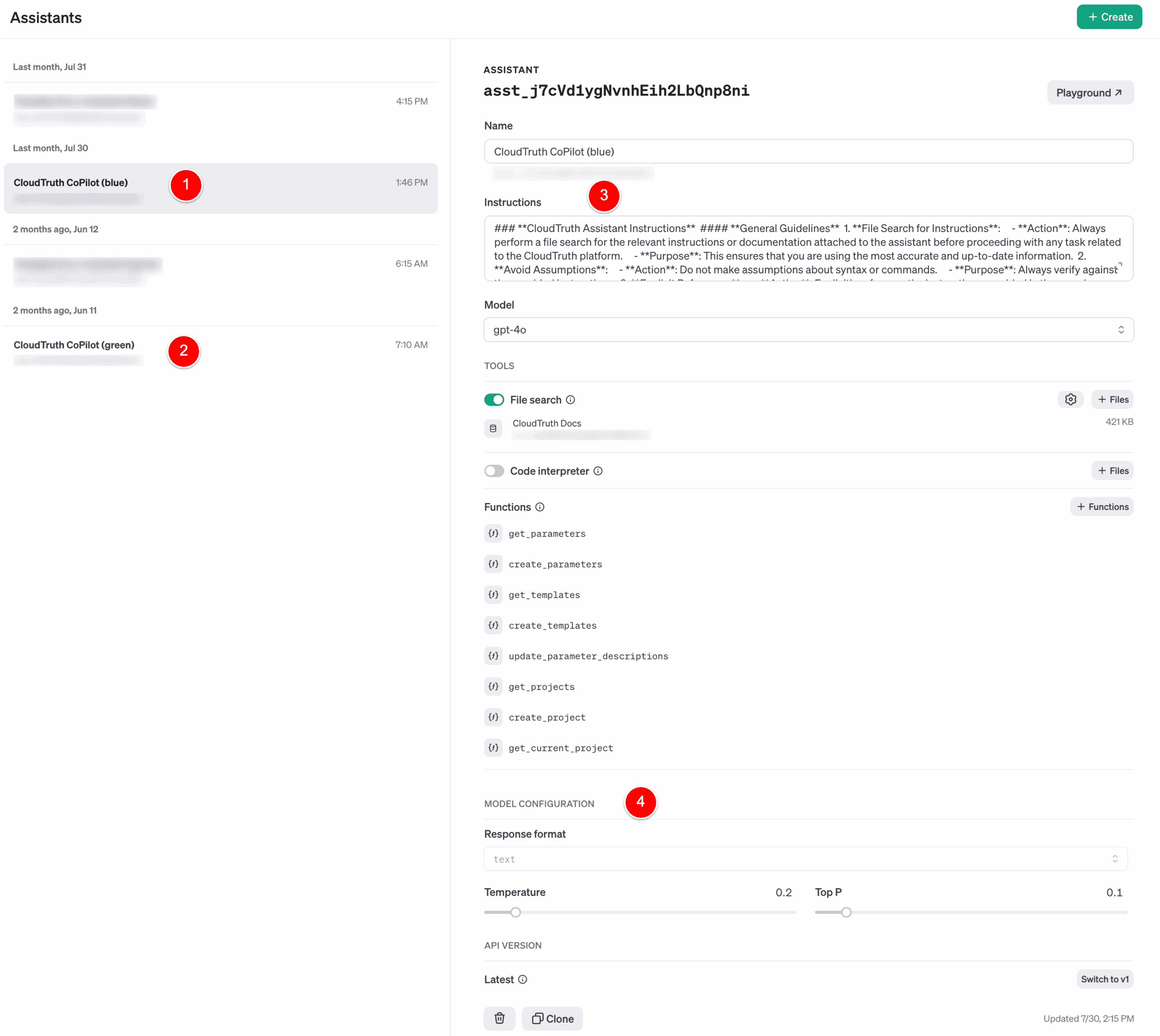
The challenge is that making configuration changes via the console is an anti-pattern and doesn't work well in a distributed development team structure.
1, 2 - Our OpenAI Assistant is called Sigma Copilot, and we have implemented blue/green configurations for better change and deployment management.
3 - Instructions are tuned frequently and managed as a configuration setting via Sigma.
4 - Model configurations are also stored in Sigma, which provides versioning, rollback, and change-tracking capabilities.
How we use Sigma to Manage our OpenAI Configurations
Since the Sigma core use case simplifies secrets and configuration complexity, it's the easiest way to manage our OpenAI configurations. We're "sipping our champagne."
Here's a brief overview of how we use Sigma with OpenAI.
Environments - the first complexity dimension
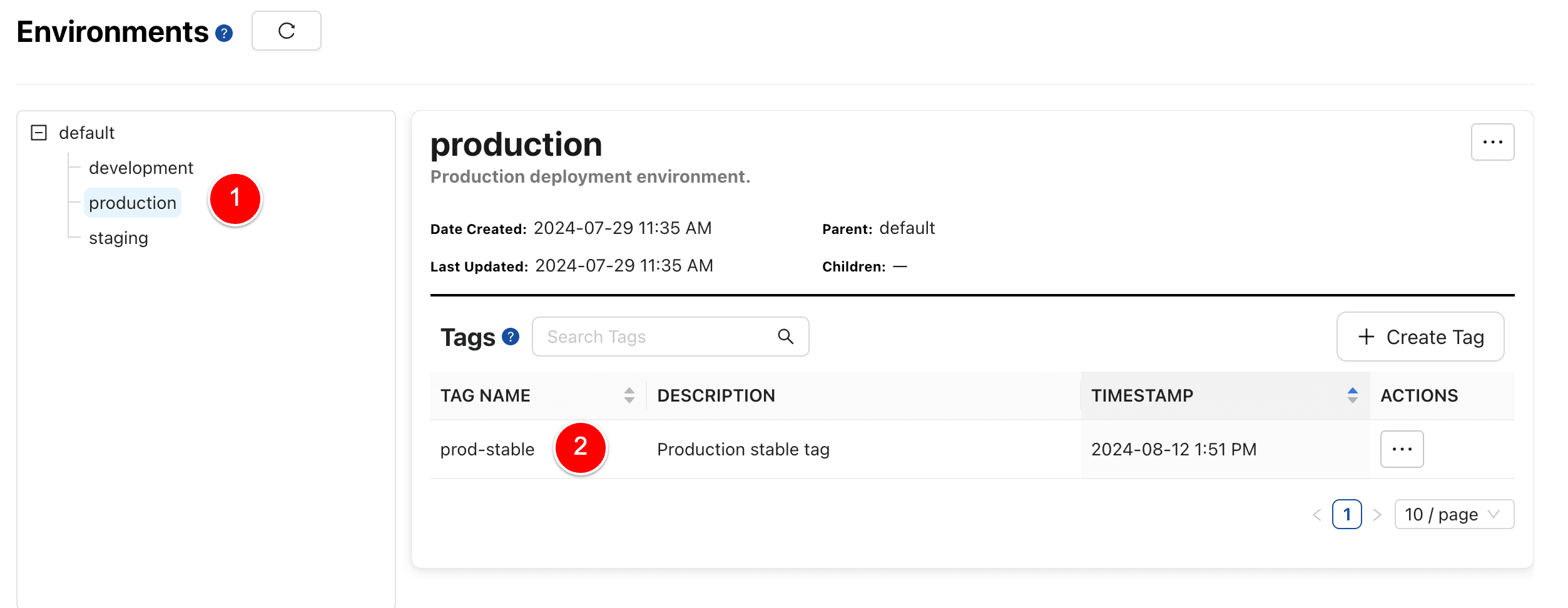
1 - Define all your environments and their hierarchy. Sigma gives you the right amount of "DRY" config and secrets by leveraging defaults, inheritance, and overrides.
2 - Create release/deployment tags that follow your Git workflow. Diff from tags, rollback, and compare settings across multiple environments.
Projects - clone blueprints for consistent configurations
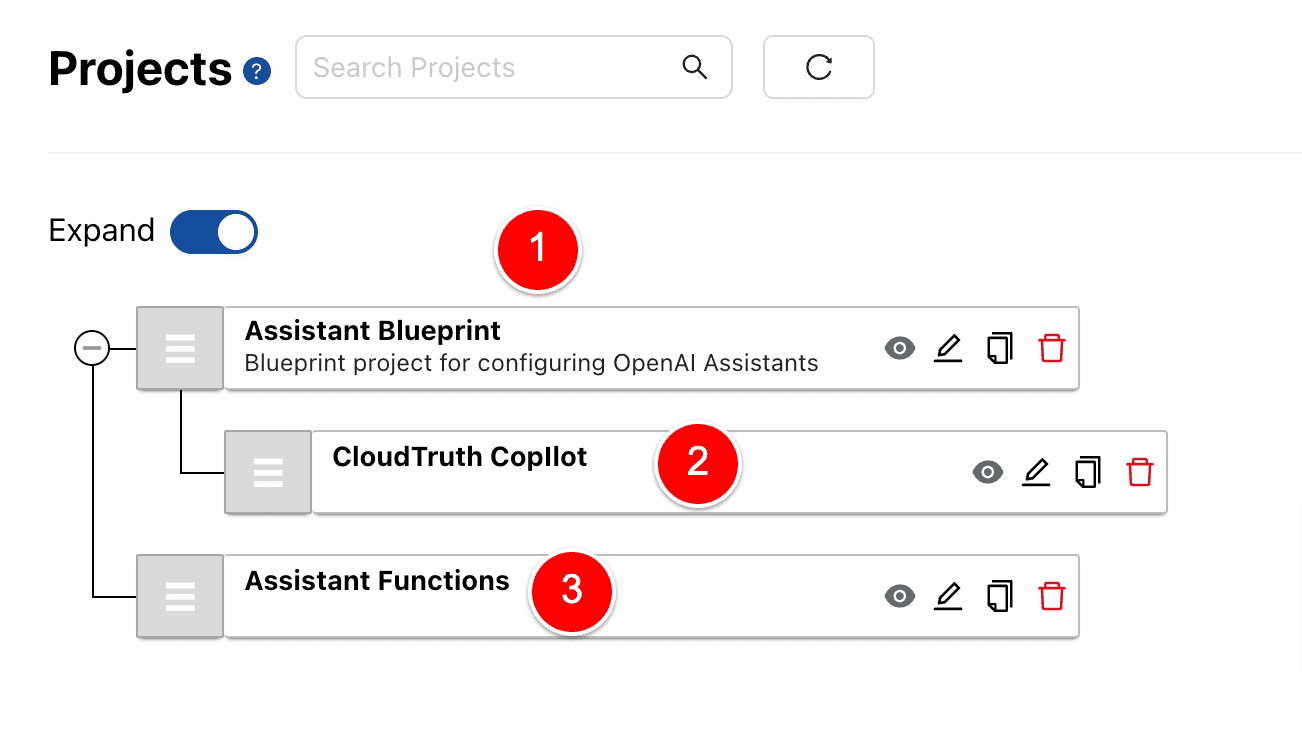
1 - Clone blueprints for all your projects. These are validated best-practice configurations for all components in your system.
2 - The "Sigma Copilot" project is a clone of the parent project "Assistant Blueprint".
3 - We also manage the assistant function configurations in a separate project for simplicity.
Parameters - secrets and variables in one place
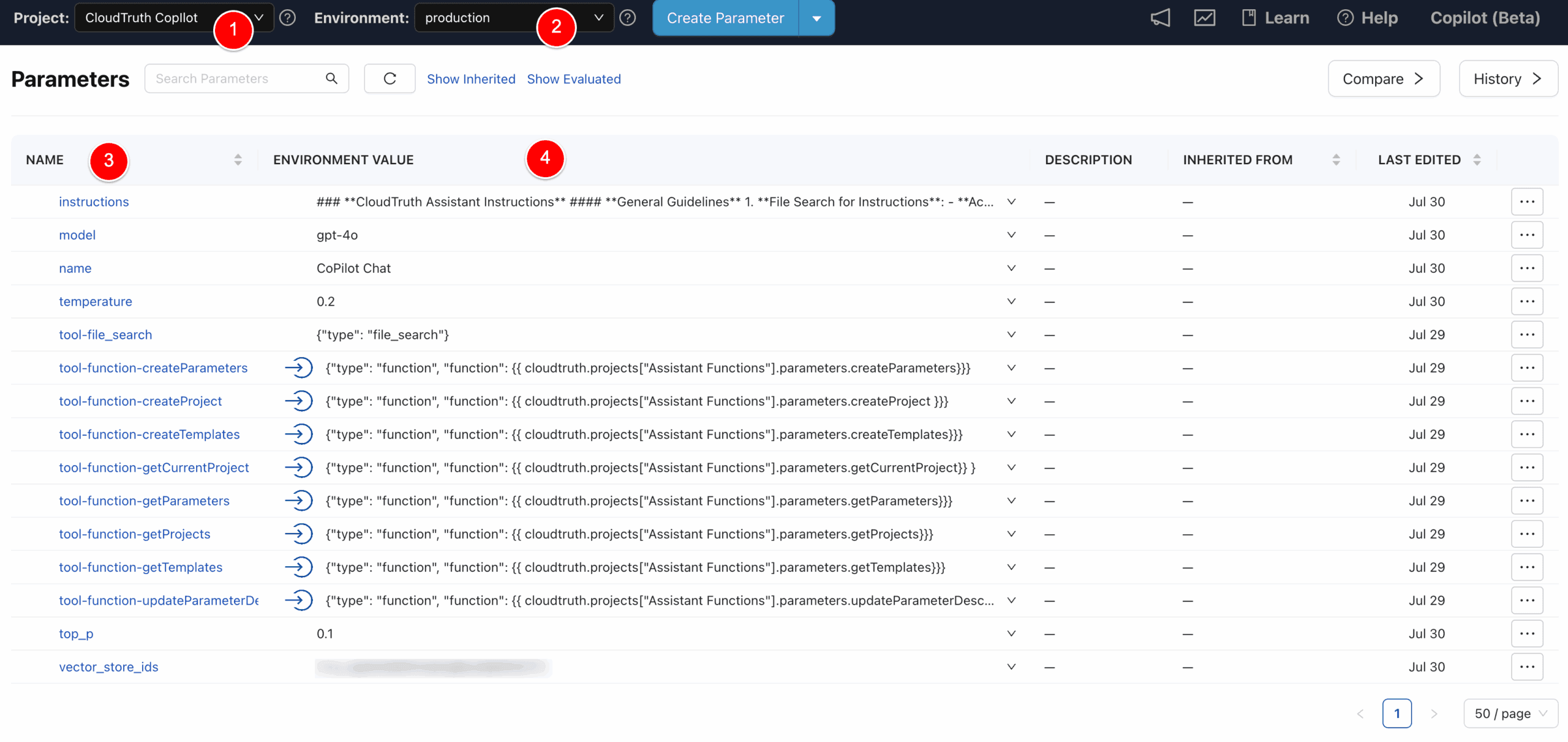
1 - Here are the configuration variable values for the Copilot project.
2 - The environment selector displays the values for each environment, such as development, staging, or production.
3 - All parameters and secrets in one place.
4 - Variables can be type-checked as string, integer, boolean, regex, or enum.
Templates - translate config data into any format (JSON, YAML, HCL, etc.)
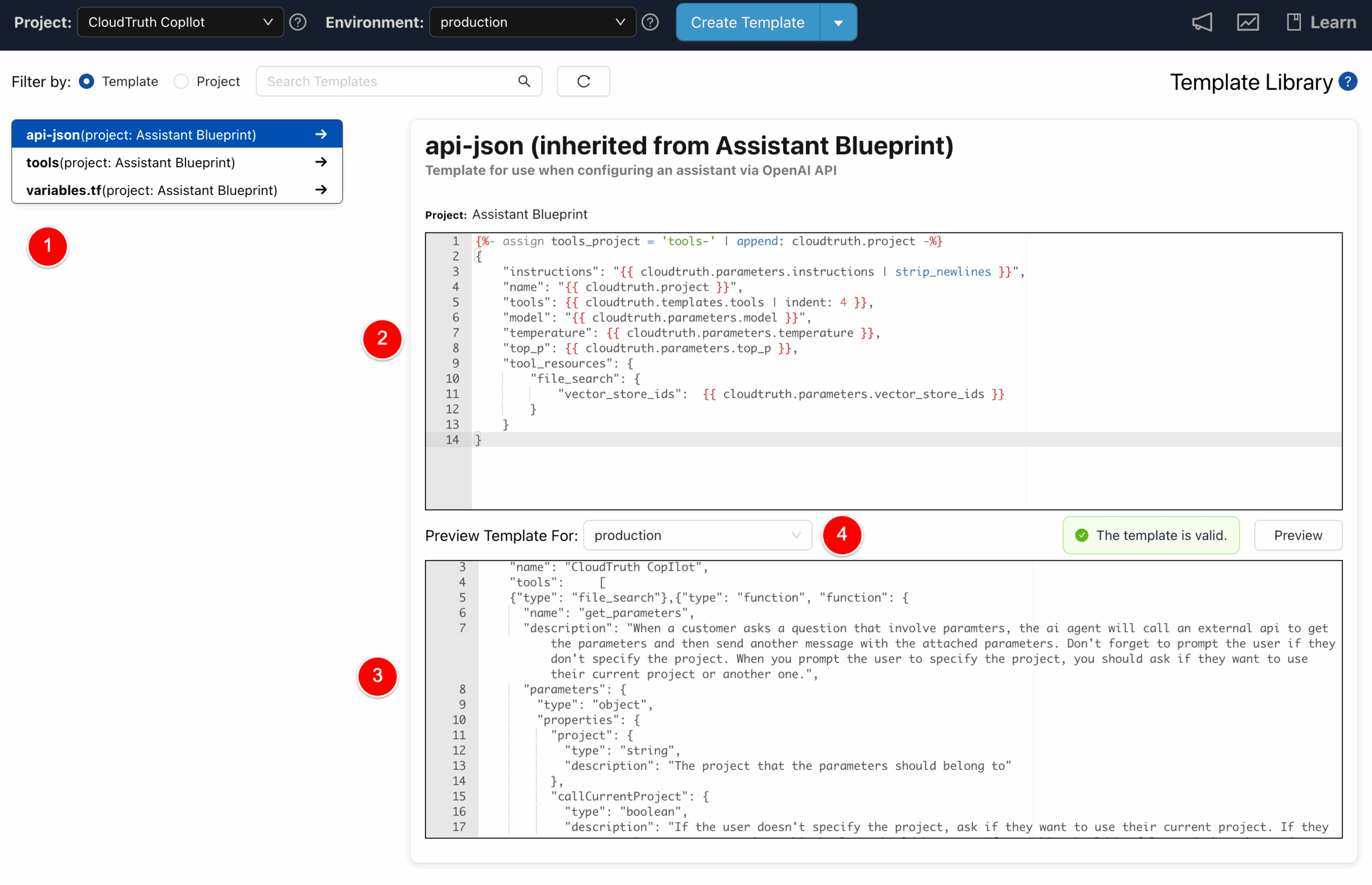
1 - Templates transform configuration data into any format, such as JSON, YAML, HCL, ENV, and ConfigMap.
2 - Templates are based on the Liquid Templating language and can be evaluated for security best practices.
3, 4 - Preview a template for any environment. Select any environment and inspect the evaluated populated template.
The "api-json" template is used in the example below:
Fetching OpenAI Config from Sigma
There are a couple of ways Sigma can configure OpenAI.
1 - Use IaC / Terraform. Have Sigma generate YAML or HCL, then use our open-source Terraform provider to apply the changes. Sigma CI/CD integrations make it easy to automate the entire deployment process.
2 - A more straightforward direct-API approach uses this sample code with the template above as the JSON data. This code runs on a trigger from our event bus when a configuration change is detected.
Wrapping up
Config and secrets data are mission-critical because, statistically, a misconfiguration causes more harm than any other type of defect. Sigma solution is an easy, reliable way to manage OpenAI configurations for data scientists, application developers, DevOps, and security.
Check out the screencast
Share Blog